Page editor
The pages on your store website have a type that represents the content being rendered on them. Each page type is connected with an object in your store, for example, product, collection, custom page. The Page editor allows you to change the layout and appearance of a page type. For instance, in Unistore default themes, you can disable displaying collection descriptions for all collection pages.
- Desktop
- Tablet
- Mobile
To start working with pages, select Page editor in Website editor.
To start working with pages:
- In Website editor, select

- In the sidebar, select Page editor
To start working with pages:
- In Website editor, select
- In the sidebar, select Page editor
Setting up pages
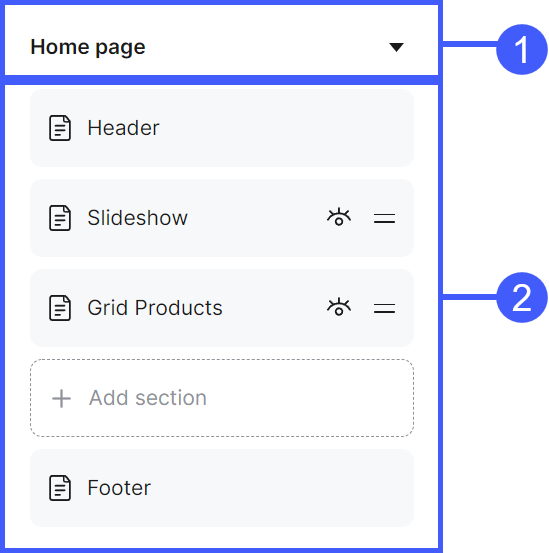
The topmost element in the Page editor sidebar is a drop-down menu. The drop-down contains all available page types for a theme. Use it to select a page type to set up. Each page type is represented by a template file. The default sections and settings for the chosen page type appear below the drop-down menu.
The typical workflow with the website pages:
- Select a page type
- Set up the page layout by adding or removing some sections
- Set up the parameters for each section
Depending on the theme you edit, some section settings may apply to all pages (for example, header and footer in the default theme). In this case, once you set up the section for one page (for example, for the home page), other pages (product and collection pages) will render this section with the same settings.
We recommend you follow these steps for all available page types.
Page types
The default Unistore themes allow setting up the following page types:
- Home page. This is the first page rendered to your customers when they access your store website
- Product page. This page displays the product images and information. This page appears after your customers select the product image or title on the home page or in a navigation menu
- Collection page. This page displays the collection products and image. This page appears after your customers select the collection image or title on the home page or in a navigation menu
Note that there can be more than one template for a certain page type. For example, a theme can have two templates for a collection page. Therefore, different collections can have different pages, and we recommend setting up each available template for your website theme.
Sections
The website theme defines the available sections for each page type and section settings. You can read more about the default theme sections in the dedicated article.